The settings a seller chooses for a Yupoo album, read in turn
Ten things decide what a Yupoo album shows you. For each one: Yupoo’s own name for it, which plans include it, what it tells you, what it leaves out, and what to do before an agent takes over.
Mark what the album shows you
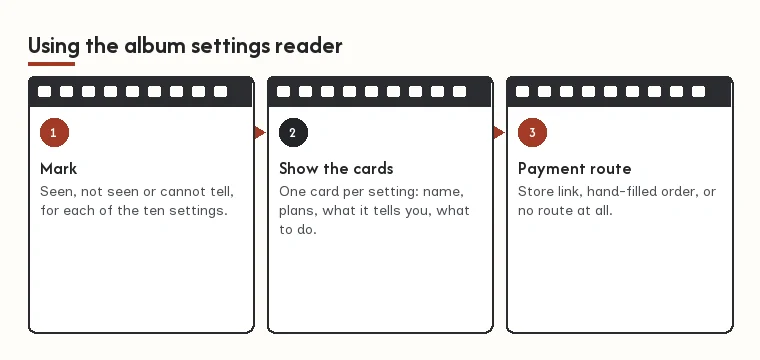
Open the album you are looking at in another window. For each setting, mark what you can see. The reader returns a card per setting and, at the end, the route you would pay by. It runs in your browser, sends nothing, takes no address and gives no score.
The switches behind every album
An album does not look the way it does by accident. The owner sets it up from Yupoo’s account settings page and back office: whether upload times show, whether an album or the whole homepage needs a code, whether photos get a watermark, how folders nest, what the contact page says and what notice sits on top. Yupoo’s tutorial account teaches each of these as a separate lesson.
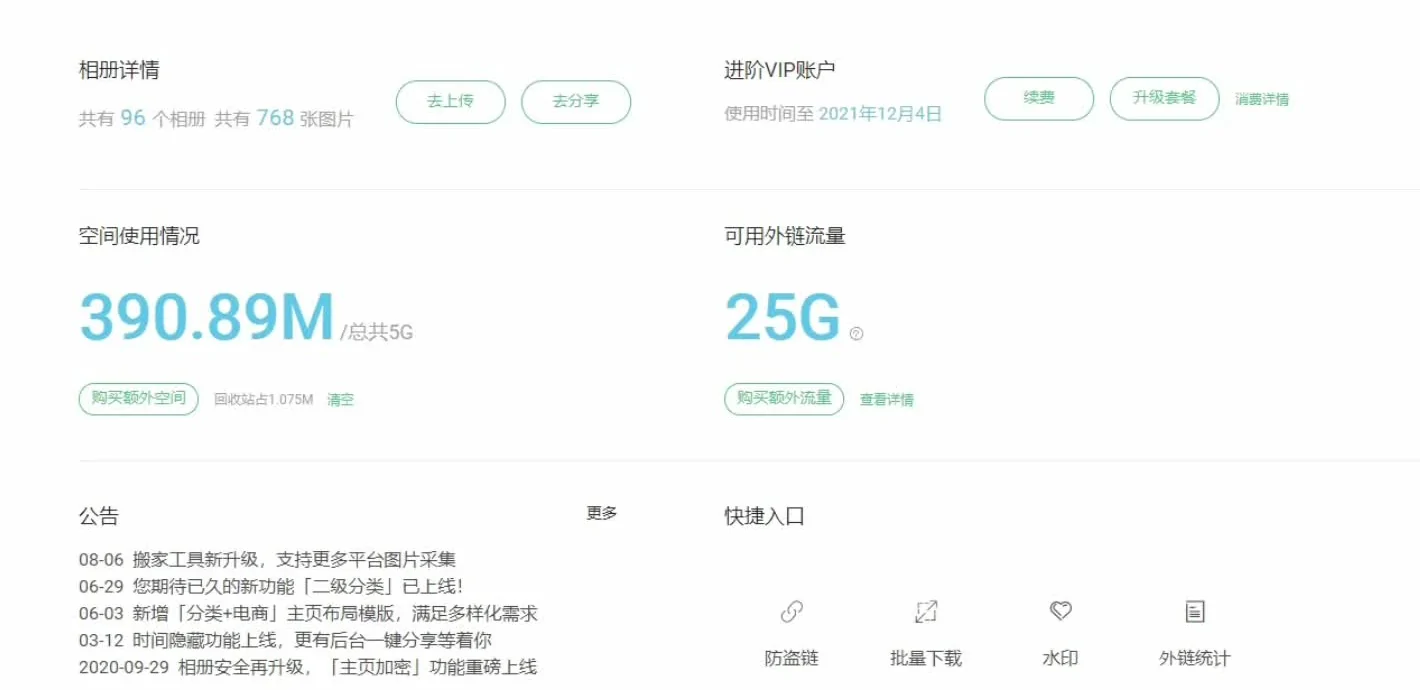
Yupoo added several of them over the years. The notice list in its own dashboard, shown below in a frame from a tutorial, announces the homepage password on 29 September 2020 and lists hidden upload times, second-level categories and a category plus e-commerce layout with a month and day but no year. The quick links on the right are anti-leech, bulk download, watermark and external link statistics.
Free and paid
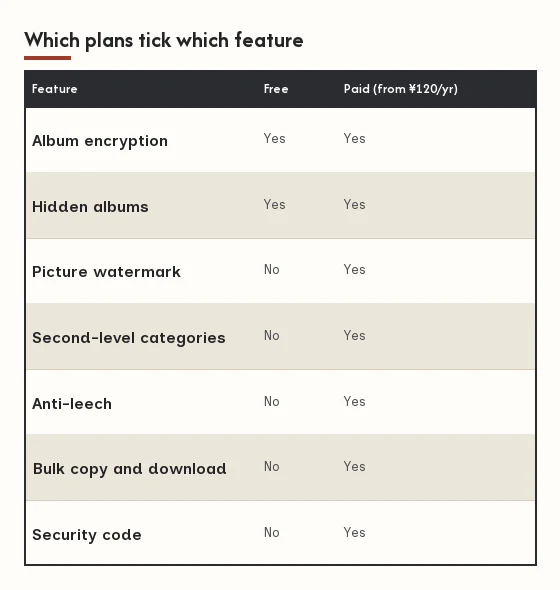
Passwords and hidden albums come with every plan. Watermarks, nested folders, anti-leech and bulk copying come with paid plans only, from ¥120 a year on the pricing page read on 17 October 2026.
What the settings cannot tell you
None of them says anything about the goods, the stock or the seller’s honesty. They tell you what you can see, how long you may be able to see it, and how you would pay.
Upload dates a seller can hide
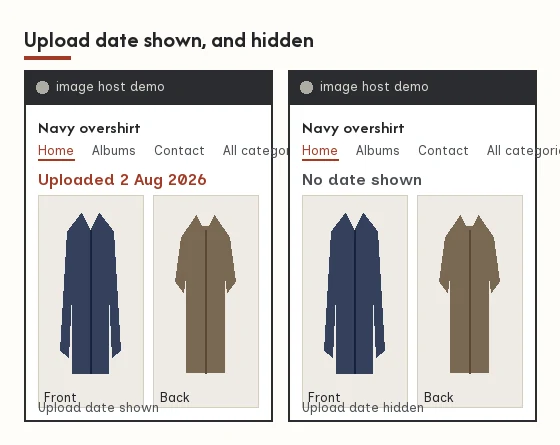
Yupoo can show when photos went into an album, and the owner can hide that. The tutorial account has a lesson called 隐藏上传时间, hide upload time, and the dashboard notice that announced it promised a one-click share feature in the same breath.
When dates show, they tell you when the photos were uploaded. That is not when the item was made, and not whether the seller can still get it. An album uploaded long ago can still be selling; one uploaded yesterday can be a copy of somebody else’s old photos. When dates are hidden, you know nothing about timing at all.
Before the agent: write the upload date, or the fact that it was hidden, into the notes field of your order and ask the agent’s buyer to confirm the item is still available before money moves. Most agents let you add such a request to the order.
A password prompt ahead of the photos
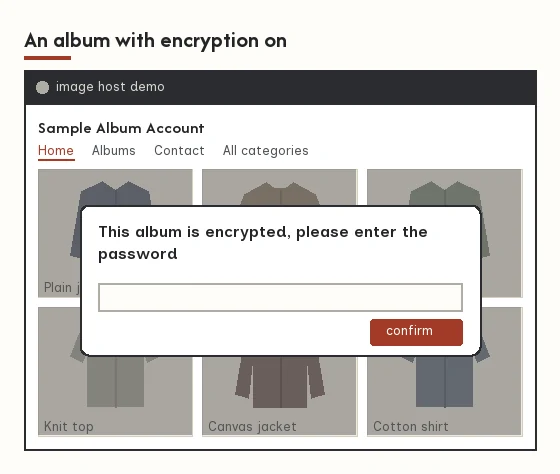
Album encryption, 相册加密 in Yupoo’s lessons, puts a code on a single album. It is ticked on all five plans, so free accounts have it too. When it is on, clicking the album cover brings up a small box. On Yupoo’s English interface the box reads: This album is encrypted, please enter the password. Until a code is entered you see the cover and the title and nothing else.
The switch tells you one thing: the owner has chosen who may look. It tells you nothing about the item, its price or the seller’s stock, and it can be turned on or off at any time, so an album that was open last week may be locked today.
Before the agent: work only from albums you can see in full. An agent’s buyer cannot order from a cover and a title, and a hand-filled form with no photos behind it gives the warehouse nothing to compare against when the parcel arrives.
A whole homepage behind a code, or switched off
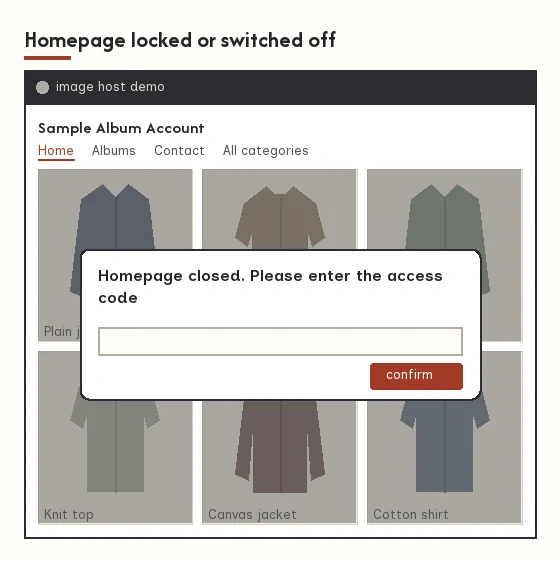
Two settings work on the whole account rather than one album. The homepage password, 主页加密, asks for an access code before the homepage opens; Yupoo’s own notice list called its relaunch on 29 September 2020 an upgrade to album security. Closing homepage access, 关闭主页访问, goes further: the tutorial says the owner sets homepage access to off in the account settings, and visitors no longer get the list of albums at all.
What we could not confirm without an account is whether the address of a single album still works while the homepage is closed. Assume it may not. Neither setting appears on the pricing table, so we cannot say which plans include them.
Before the agent: keep the exact album address you used, the photos you are relying on and the album title, saved on your own device. If you cannot browse back to the album later, those copies are all the warehouse and you will have to compare against.
Watermarks and sub-folders sit on paid plans
A picture watermark, 图片添加水印, is stamped when the photo is uploaded: the owner picks a template, and Yupoo’s homepage says up to five templates can be saved and changed at any time. The lesson adds one practical note, that a watermark larger than the original picture will not show. Second-level categories, 二级分类, let folders open into further folders; the dashboard notice that announced them called them a long-awaited feature.
Yupoo’s own watermark tool and nested-category feature are listed on the paid plans. A visible watermark does not establish the uploader’s plan: the image could have been marked before upload or copied. Neither a mark nor a paid feature establishes ownership of the goods or seller reliability.
Before the agent: keep one watermarked photo and write down the folder path to the album, such as the category and sub-category names. The path helps the buyer describe the item to the seller, and the photo is what you will hold the warehouse pictures against.
Store links and chat handles on the contact page
The Contact tab shows the contact profile, 联系档案, which the owner edits from the account settings page. Yupoo puts no structure on it: it can hold a Weidian or Taobao store link, a list of chat handles, a phone number, a paragraph of text or nothing. Yupoo’s own tutorial account leaves it almost empty, which is a useful reminder that a blank contact page is allowed.
This page decides how you pay. A store link means there is a marketplace listing with its own price, stock and options, and the agent can usually buy it from the link. Chat handles alone mean the payment is arranged with the seller in a chat, so the agent’s buyer will message them and there is no marketplace standing behind the sale.
Before the agent: if there is a store, find the listing that matches the album item and give the agent that listing link. If there are only chat handles, use the agent’s hand-filled form and copy the seller’s contact into the notes field, as Basetao asks in so many words. LoongBuy’s older Chinese help page walks through this same case with a Yupoo album as its example. This site never prints a seller’s handle.
Prices typed into titles, and size charts among the photos
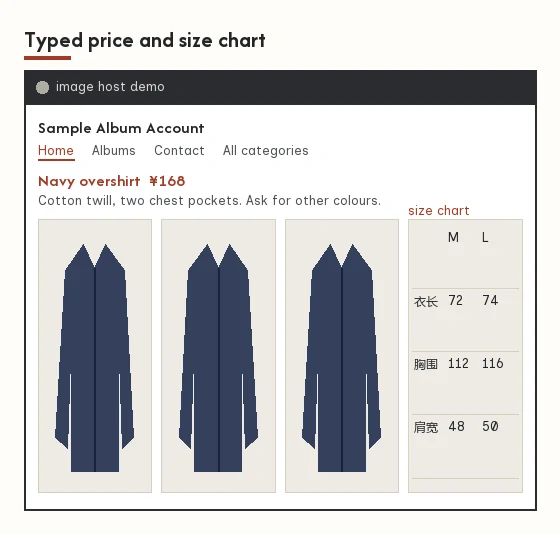
A price and a size chart are seller-supplied content, rather than Yupoo account settings. Check whether a written price is current, what currency it uses and whether it includes the selected option and domestic postage. If no price is visible, look for a matching store listing or ask the buyer to confirm it before purchase.
Size charts are usually the last photo in an album: a table in centimetres with Chinese column labels for length, chest, shoulder and sleeve. Hand measurements often differ by a centimetre or two, and letter sizes on Chinese labels tend to run small.
Before the agent: enter the album price as the item price and expect the buyer to confirm it or ask for a difference; Kakobuy’s form even suggests entering 1 yuan when the price is unknown. Save the size chart, compare it with a garment you own, and ask for a measurement on arrival if your agent offers one.
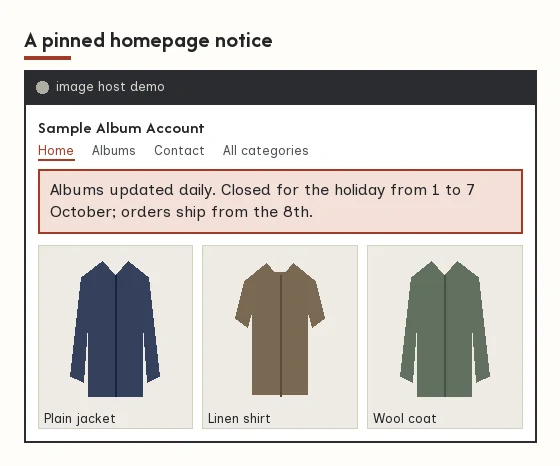
A notice pinned above the albums
The homepage notice can contain dispatch breaks, restock dates or instructions for contacting the seller. Translate it and ask about any ambiguous date or condition before ordering; automated translation can misread short codes or abbreviations.
A notice tells you about the seller’s routine, not about any one item. The useful part is usually timing. A notice announcing a break around a Chinese holiday means your item will reach the agent’s warehouse later than the agent’s usual estimate.
Before the agent: run the notice through a translator before you order. If it mentions a break, add a line to the order note asking for the expected dispatch date, so the buyer asks the seller rather than waiting.
Using the reader and the search box
This site has two tools. The album settings reader at the top of this page works through the ten settings above: mark each one as seen, not seen or cannot tell, press Show the cards, and read one card per setting with the payment route at the end. Unmarked settings are read as cannot tell. It runs entirely in your browser; nothing you mark is sent anywhere, and you can clear it with one button.
The search box on the home page is how to use the search side of the site: type what the item is, such as a plain hoodie, a wool coat or a linen shirt, and you land on matching catalog listings that agents can buy from a link. It searches the catalog, not Yupoo; this site’s search covers the product catalogue rather than Yupoo albums.
Neither tool rates sellers, finds albums or tells you whether an item is genuine. They help you see what is in front of you and decide how to pay for it.